工具:
IDE:Eclipse IDE for Java Developers-2023-09
数据库:MySQL 8
功能说明
用java SWT做一个图书管理系统,要求实现如下功能:
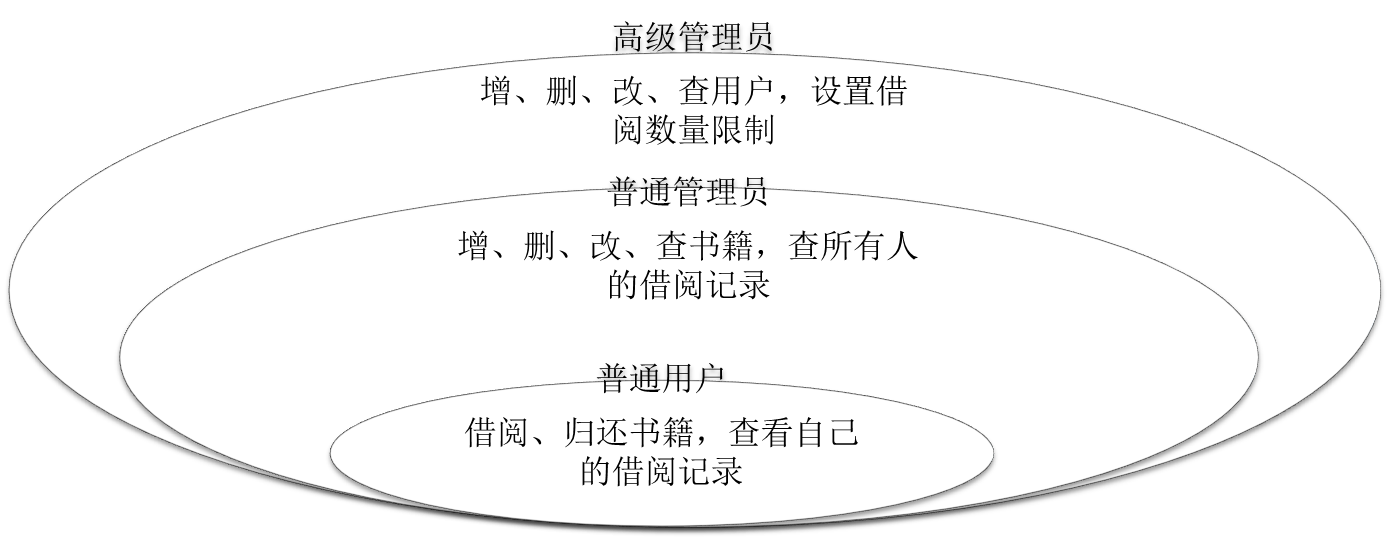
- 用户从登录窗口登录。用户身份有3种:高级管理员,普通管理员,普通用户。权限如下:
- 高级管理员具有所有权限,包括增、删、改、查书籍和用户,借书和还书,设置借阅数量限制,查看所有人的借阅记录;
- 普通管理员只能增、删、改、查书籍,借书,还书,查看所有人的借阅记录;
- 普通用户只能借书和还书,查看自己的借阅记录。
- 所有用户和书籍均有正常和冻结两种状态。
- 高级管理员可以设置所有用户和书籍的状态,普通管理员只可以设置书籍的状态。
- 被冻结的用户只能进行还书和查询操作,被冻结的书籍只能被还而不能被借。
数据库设计
使用MySQL建立Library数据库,创建5个表:
- 表books存储所有书籍的信息,包括ISBN(唯一标识)、书名、作者、书籍类型(文学、科学等)、出版社、出版日期、馆藏总数、借出数量、未借出数量、书籍状态(正常或冻结)和添加日期;
- 表users存储所有用户(包括高级管理员,普通管理员和普通用户)的信息,包括用户名、姓名、登录密码、身份类型(上述三种身份之一)、用户状态(正常或冻结)和添加日期;
- 表records存储用户的借还记录信息,包括操作时间、用户名、姓名、ISBN、书名、操作类型(借阅或归还)和操作数量;
- 表states存储用户借还书籍的状态信息,包括用户名、姓名、ISBN、书名、共借过该本书的数量、已还数量、未还数量。这里用户名和ISBN共同确定一条记录,某用户多次借还该本书会以累加的计算方法改变该条记录;
- 表settings只存储两个数,最大允许借阅总数和单本最大允许借阅数量,只能由高级管理员设置。
创建数据库:
create database Library;
各个表的字段信息设置如下所述。
books表
字段设置:
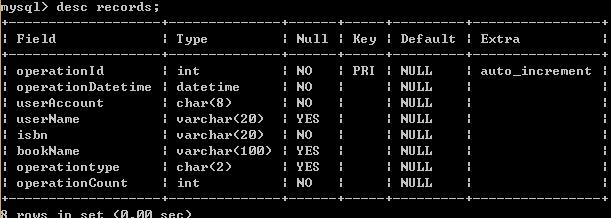
建表books语句:
create table books(bookId int not null auto_increment,isbn varchar(20) not null,bookName varchar(20) not null,author varchar(20),bookType varchar(10),publisher varchar(20),publishDate date, totalCount int not null,borrowedCount int not null default 0,unborrowedCount int,bookState varchar(2) default '正常',primary key (bookId))engine=innodb default charset=utf8;
下面是分行展示的books的几条记录:


users表
字段设置:
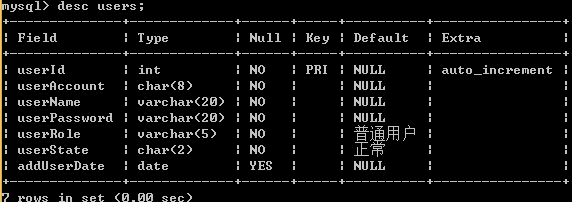
建表users语句:
create table users(userId int(5) not null auto_increment,userAccount char(8) not null,userName varchar(20) not null,userPassword varchar(20) not null,userRole varchar(5) not null default '普通用户',userState char(2) not null default '正常',primary key (userId))engine=innodb default charset=utf8;
由于需要登录使用,需要先预置一个高级管理员角色:
insert into users(userAccount,userName,userPassword,userRole) values('00000000','张三','password','高级管理员');
还可以手动添加其他用户。
users的几条记录:

records表
字段设置:
建表records语句:
create table records(operationId int not null auto_increment,operationDatetime datetime not null,userAccount char(8) not null,userName varchar(20),isbn varchar(20) not null,bookName varchar(20),operationType char(1) not null,operationCount int not null,primary key (operationId))engine=innodb default charset=utf8;
records的几条记录:

states表
字段设置:
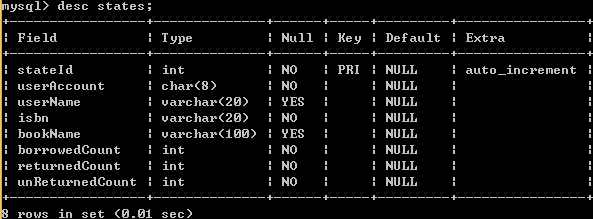
建表states语句:
create table states(stateId int not null,userAccount char(8) not null,userName varchar(20),isbn varchar(20) not null,bookName varchar(20),borrowedCount int not null,returnedCount int not null,unReturnedCount int not null,primary key (stateId))engine=innodb default charset=utf8;
states的几条记录:

settings表
字段设置:
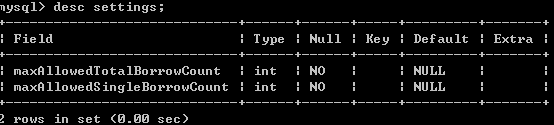
建表settings语句:
create table settings(maxAllowedTotalBorrowCount int not null,maxAllowedSingleBorrowCount int not null)engine=innodb default charset=utf8;
同样,settings的记录也需要预置:
insert into settings values(10,5);
settings存储的记录:
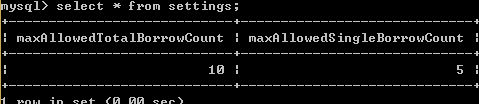
用户预置
需要预置一个数据库用户用于连接数据库,用户名为scott,密码为tiger,赋予所有权限:
create user 'scott' identified by 'tiger';
grant all privileges on *.* to 'scott'@'%' with grant option;
UI设计
登录窗口
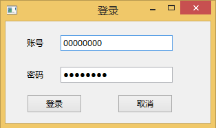
所有用户共用一个登录窗口,根据所输入的用户名是否存储在users表中及密码是否正确来决定是否允许登录。登录时从users表获取用户的身份,不同身份有不同的展示项。
主界面
高级管理员界面展示所有书籍、所有用户、所有借阅状态、我的借阅状态四个表格界面,这里通过SWT中的扩展栏实现四个界面的切换展示。
所有书籍和所有用户界面提供增删改查按钮,所有借阅状态和我的借阅状态只提供查找按钮,其表格内容由用户的操作自动存入数据库,不能更改。借阅记录详情通过表格的上下文菜单弹出。
高级管理员界面同时展示设置、更新、返回登录界面、退出四个按钮。设置按钮用于设置用户的最大可借阅总数和最大单本可借阅数量;更新按钮用于当进行增删改查操作后更新展示的信息。
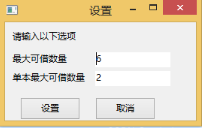
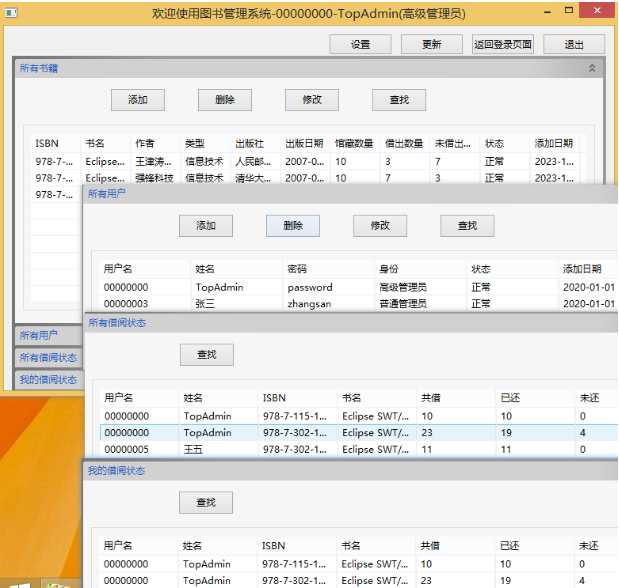
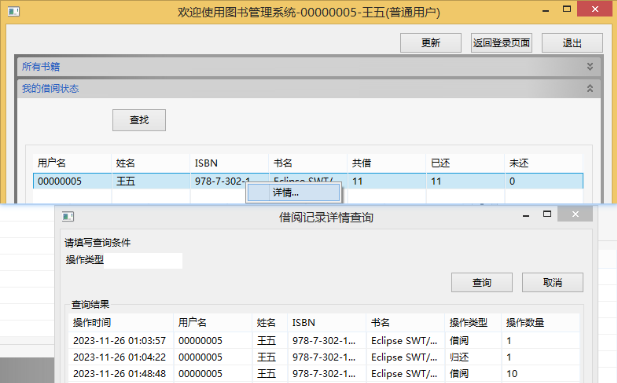
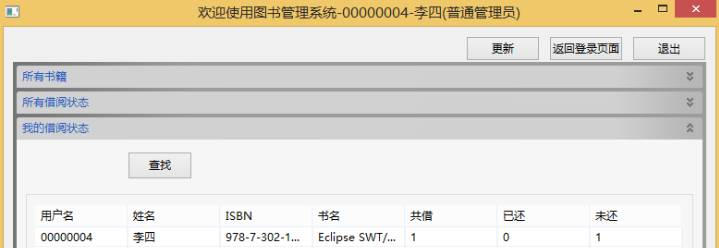
普通管理员展示所有书籍、所有借阅状态和我的借阅状态三项:
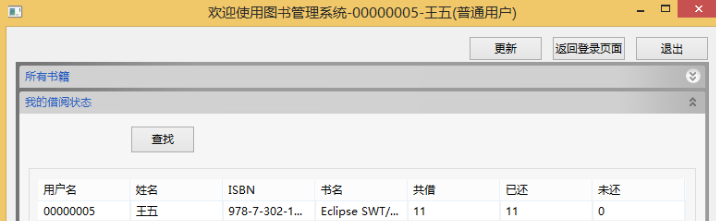
普通用户只展示所有书籍和我的借阅状态两项:
上下文菜单
图书借还功能通过选中书籍表格行时右键弹出的上下文菜单提供。图书和登录用户的状态不同,右键菜单也不同。图书和登录用户有任一个冻结时,不弹出借阅按钮。图书未被登录用户借阅时,不弹出归还按钮。
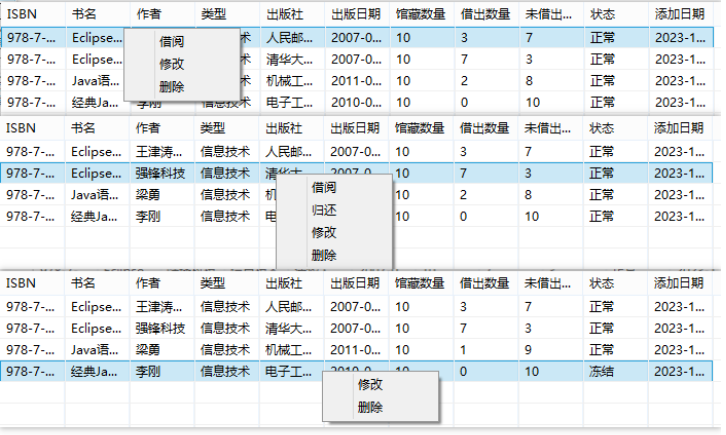
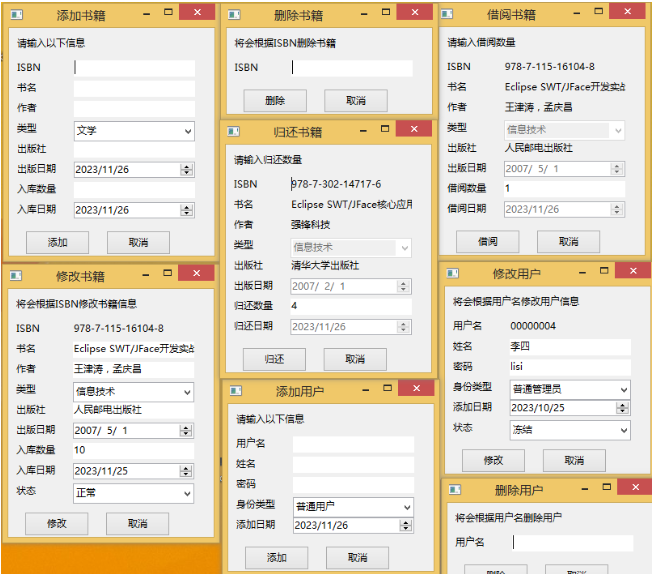
对话框
当点击添加、删除、修改、借阅和归还按钮时,弹出相应的操作面板:
查询界面
点击查找按钮,弹出响应的查询面板,其中可以通过设置一些条件筛选:

类实现
考虑到上述界面有大量的共同点,因此通过类来实现,通过传入不同的构造参数即可展示不同的面板。
这里建立MainUI类,不同身份的用户登录时,传入的构造参数决定了展示哪些表格和按钮项;
建立OperationComposition类,继承Composition类,用于在扩展项中包含操作按钮和表格;
建立ExtendedTable类,继承Table类,根据传入的构造参数(包括要展示的数据等)绘制表格,类中还会根据登录用户的身份选择在表格上弹出哪些上下文菜单;
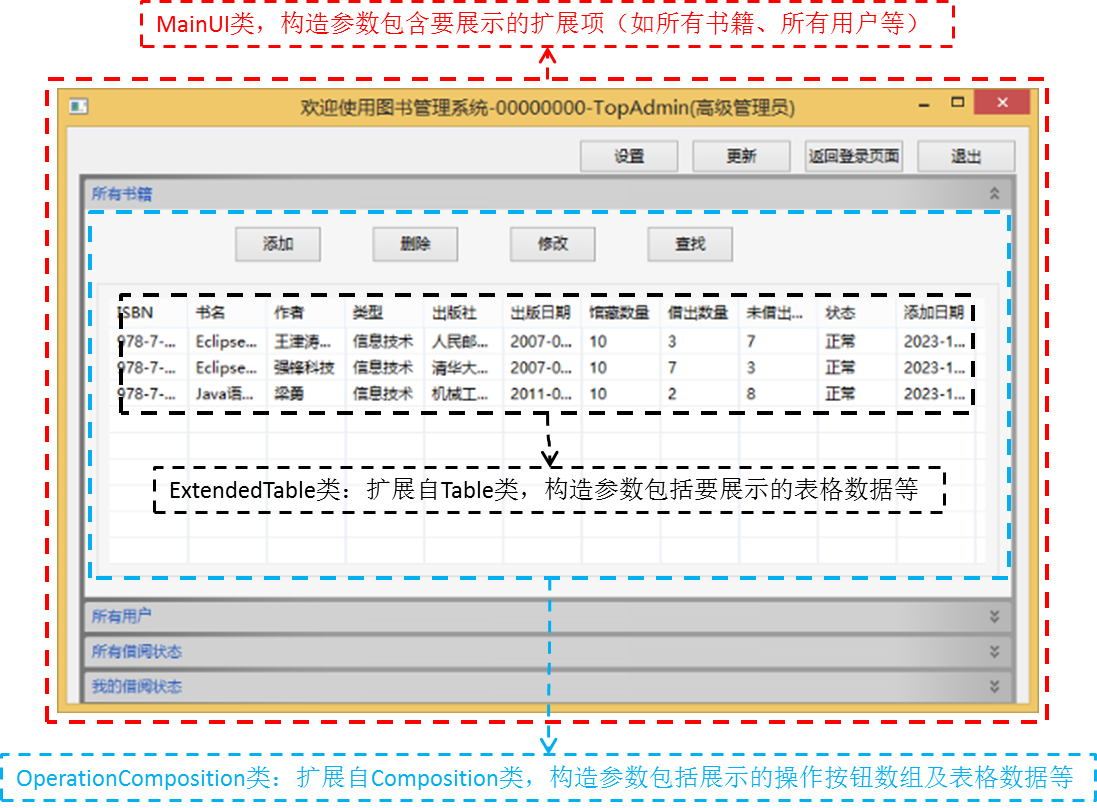
建立OperationPanel类,用于点击增、删、改和借还按钮时弹出面板,构造参数包括要展示的输入项等;
建立SearchUI类,用于点击查找按钮时弹出查询面板,可以设置一些查询条件。SearchUI类中构造了ExtendedTable对象用于展示查询到的表格数据。
关键部分代码:
登录界面 LoginShell2
LoginShell2.java:
import org.eclipse.swt.widgets.Display;
import org.eclipse.swt.widgets.Shell;
import org.eclipse.swt.widgets.Label;
import org.eclipse.swt.widgets.MessageBox;
//import java.beans.Statement;
import java.sql.Connection;
import java.sql.Driver;
import java.sql.DriverManager;
import java.sql.ResultSet;
import java.sql.SQLException;
import java.sql.Statement;
import org.eclipse.swt.SWT;
import org.eclipse.swt.widgets.Text;
//import org.eclipse.wb.swt.NormUserUI;
import org.eclipse.swt.widgets.Button;
import org.eclipse.swt.events.SelectionAdapter;
import org.eclipse.swt.events.SelectionEvent;
public class LoginShell2 {
	protected Shell loginShell;
	private Text Account_textField;
	private Text Password_textField;
	Connection connection;
	public Statement statement;
	String account;
	String password;
	//static Shell parentShell;
	/**
	 * Launch the application.
	 * @param args
	 */
	public static void main(String[] args){
		try {
			LoginShell2 window = new LoginShell2();
			window.open();
		} catch (Exception e) {
			e.printStackTrace();
		}
	}
	/**
	 * Open the window.
	 */
	public void open() {
		Display display = Display.getDefault();
		createContents();
		loginShell.open();
		loginShell.layout();
		while (!loginShell.isDisposed()) {
			if (!display.readAndDispatch()) {
				display.sleep();
			}
		}
	}
	/**
	 * Create contents of the window.
	 */
	protected void createContents(){
		loginShell = new Shell();
		loginShell.setSize(314, 187);
		loginShell.setText("u767Bu5F55");
		loginShell.setMaximumSize(314, 187);
		loginShell.setMinimumSize(314, 187);

		Label label = new Label(loginShell, SWT.NONE);
		label.setBounds(31, 23, 40, 17);
		label.setText("u8D26u53F7");

		Label lblNewLabel = new Label(loginShell, SWT.NONE);
		lblNewLabel.setBounds(31, 69, 40, 17);
		lblNewLabel.setText("u5BC6u7801");

		Account_textField = new Text(loginShell, SWT.BORDER);
		Account_textField.setText("00000000");
		Account_textField.setBounds(80, 20, 163, 23);

		Password_textField = new Text(loginShell, SWT.BORDER | SWT.PASSWORD);
		Password_textField.setText("password");
		Password_textField.setBounds(80, 66, 163, 23);

		try {
			connection=DriverManager.getConnection("jdbc:mysql://localhost/Library","scott","tiger");
			statement=connection.createStatement(ResultSet.TYPE_SCROLL_INSENSITIVE,ResultSet.CONCUR_UPDATABLE);
		} catch (Exception e) {
			// TODO: handle exception
			e.printStackTrace();
		}

		Button LoginButton = new Button(loginShell, SWT.NONE);
		LoginButton.addSelectionListener(new SelectionAdapter() {
			@Override
			public void widgetSelected(SelectionEvent e){
				//连接数据库
				try {
					//Class.forName("com.mysql.jdbc.Driver");
					//Class.forName("om.mysql.cj.jdbc.Driver");
					//Connection connection=DriverManager.getConnection("jdbc:mysql://localhost/Library","scott","tiger");
					//Statement statement=connection.createStatement();
					account=Account_textField.getText();
					password=Password_textField.getText();
					ResultSet resultSet=statement.executeQuery("select userpassword,userrole from users where userAccount='"+account+"'");
					resultSet.next();
					String queried_role;
					if(!account.equals("")) {
						if(!password.equals("")) {
							if(resultSet.getString(1).equals(password)) {
								switch (resultSet.getString(2)) {
								case "高级管理员":
									MainUI mainUI=new MainUI(account,"高级管理员",new String[] {"所有书籍","所有用户","所有借阅状态","我的借阅状态"},statement);
									break;
								case "普通管理员":
									mainUI=new MainUI(account,"普通管理员",new String[] {"所有书籍","所有借阅状态","我的借阅状态"},statement);
									break;
								case "普通用户":
									mainUI=new MainUI(account,"普通用户",new String[] {"所有书籍","我的借阅状态"},statement);
									break;
								default:
									break;
								}
								loginShell.close();
								MainUI.main(null);
							}
							else {
								MessageBox messageBox=new MessageBox(loginShell,SWT.ICON_INFORMATION|SWT.OK);
								messageBox.setText("提示");
								messageBox.setMessage("用户名或密码错误,请重新输入!");
								int message=messageBox.open();
							}
						}
						else {
							MessageBox messageBox=new MessageBox(loginShell,SWT.ICON_INFORMATION|SWT.OK);
							messageBox.setText("提示");
							messageBox.setMessage("密码不能为空!");
							int message=messageBox.open();
						}
					}
					else {
						MessageBox messageBox=new MessageBox(loginShell,SWT.ICON_INFORMATION|SWT.OK);
						messageBox.setText("提示");
						messageBox.setMessage("用户名不能为空!");
						int message=messageBox.open();
						//e.doit=message==SWT.YES;
						return ;
					}
				} catch (Exception e2) {
					// TODO: handle exception
					e2.printStackTrace();
				}
			}
		});
		LoginButton.setBounds(31, 106, 80, 27);
		LoginButton.setText("u767Bu5F55");

		Button CancelButton = new Button(loginShell, SWT.NONE);
		CancelButton.addSelectionListener(new SelectionAdapter() {
			@Override
			public void widgetSelected(SelectionEvent e) {
				loginShell.close();
			}
		});
		CancelButton.setBounds(163, 106, 80, 27);
		CancelButton.setText("u53D6u6D88");
	}
}
主界面 MainUI
MainUI.java:
import java.sql.ResultSet;
import java.sql.Statement;
import org.eclipse.swt.SWT;
import org.eclipse.swt.events.ExpandEvent;
import org.eclipse.swt.events.ExpandListener;
import org.eclipse.swt.events.SelectionAdapter;
import org.eclipse.swt.events.SelectionEvent;
import org.eclipse.swt.events.SelectionListener;
import org.eclipse.swt.widgets.Button;
import org.eclipse.swt.widgets.Composite;
import org.eclipse.swt.widgets.Display;
import org.eclipse.swt.widgets.ExpandBar;
import org.eclipse.swt.widgets.ExpandItem;
import org.eclipse.swt.widgets.Shell;
public class MainUI {
	protected Shell shell;
	static String account="";
	static String role="";
	static String[] itemArray= {};
	static ResultSet resultSet=null;
	static Statement statement=null;
	Composite itemComposite=null;
	ExpandBar expandBar=null;
	public MainUI(String newAccount,String newRole,String [] newItemArray,Statement newStatement) {
		// TODO Auto-generated constructor stub
		account=newAccount;
		role=newRole;
		itemArray=newItemArray;
		//resultSet=newResultSet;
		statement=newStatement;
	}
	/**
	 * Launch the application.
	 * @param args
	 */
	public static void main(String[] args) {
		try {
			MainUI window = new MainUI(account,role,itemArray,statement);
			window.open();
		} catch (Exception e) {
			e.printStackTrace();
		}
	}
	/**
	 * Open the window.
	 */
	public void open() {
		Display display = Display.getDefault();
		createContents();
		shell.open();
		shell.layout();
		while (!shell.isDisposed()) {
			if (!display.readAndDispatch()) {
				display.sleep();
			}
		}
	}
	/**
	 * Create contents of the window.
	 */
	protected void createContents() {
		shell = new Shell();
		shell.setSize(786,499);
		String userName="";
		try {

			resultSet= statement.executeQuery("select userName from users where userAccount='"+account+"'");
			resultSet.next();
			userName=resultSet.getString(1);
		} catch (Exception e) {
			// TODO: handle exception
			e.printStackTrace();
		}
		shell.setText("欢迎使用图书管理系统-"+account+"-"+userName+"("+role+")");
		shell.setMaximumSize(786, 500);
		shell.setMinimumSize(786,500);
		if(role.equals("高级管理员")) {
			Button settingBtn=new Button(shell,SWT.None);
			settingBtn.setText("设置");
			settingBtn.setBounds(410,10,80,27);
			settingBtn.addSelectionListener(new SelectionListener() {

				@Override
				public void widgetSelected(SelectionEvent arg0) {
					// TODO Auto-generated method stub
					try {
						resultSet=statement.executeQuery("select * from settings");
						resultSet.next();
						String maxAllowedTotalBorrowCountStr=resultSet.getString(1);
						String maxAllowedSingleBorrowCountStr=resultSet.getString(2);
						//new OperationPanel(account,userName, operationStr,objectStr,tipStr,labelStrArray,defaultValuesArray,editAllowedArray, statement);
						OperationPanel settingOperationPanel=new OperationPanel("","","设置","","请输入以下选项",new String[] {"最大可借数量","单本最大可借数量"},new String[] {maxAllowedTotalBorrowCountStr,maxAllowedSingleBorrowCountStr},new Boolean[] {true,true},statement);
						settingOperationPanel.main(null);
					}catch (Exception e) {
						// TODO: handle exception
						e.printStackTrace();
					}
				}

				@Override
				public void widgetDefaultSelected(SelectionEvent arg0) {
					// TODO Auto-generated method stub

				}
			});
		}

		update();
		Button updateBtn = new Button(shell, SWT.NONE);
		updateBtn.setBounds(500, 10, 80, 27);
		updateBtn.setText("u66F4u65B0");
		updateBtn.addSelectionListener(new SelectionListener() {
			@Override
			public void widgetSelected(SelectionEvent arg0) {
				// TODO Auto-generated method stub
				//expandBar.set
				update();
			}
			@Override
			public void widgetDefaultSelected(SelectionEvent arg0) {
				// TODO Auto-generated method stub
			}
		});
		Button BackwardBtn = new Button(shell, SWT.NONE);
		BackwardBtn.addSelectionListener(new SelectionAdapter() {
			@Override
			public void widgetSelected(SelectionEvent e) {
				shell.close();
				LoginShell2 loginShell2=new LoginShell2();
				loginShell2.main(null);
			}
		});
		BackwardBtn.setBounds(590, 10, 80, 27);
		BackwardBtn.setText("u8FD4u56DEu767Bu5F55u9875u9762");

		Button exitBtn = new Button(shell, SWT.NONE);
		exitBtn.addSelectionListener(new SelectionAdapter() {
			@Override
			public void widgetSelected(SelectionEvent e) {
				shell.close();
			}
		});
		exitBtn.setBounds(680, 10, 80, 27);
		exitBtn.setText("退出");


	}
	void update() {
		if(expandBar!=null)
			expandBar.dispose();
		expandBar=new ExpandBar(shell, 0);
		expandBar.setBounds(10, 38, 750, 425);
		expandBar.addExpandListener(new ExpandListener() {
			@Override
			public void itemExpanded(ExpandEvent arg0) {
				// TODO Auto-generated method stub
				for(ExpandItem item:expandBar.getItems()) {
					item.setExpanded(false);//这里循环设置其他扩展项关闭
				}
			}
			@Override
			public void itemCollapsed(ExpandEvent arg0) {
				// TODO Auto-generated method stub 这个不用管
			}
		});
		for(String expandItemStr:itemArray) {
			String[] tableHeadersStrArray= {};
			String[] operationStrArray= {};
			String tableName="";
			switch (expandItemStr) {
			case "所有书籍":
				try {
					tableName="books";
					if (role.indexOf("管理员")!=-1)
						operationStrArray=new String[] {"添加","删除","修改","查找"};
					else
						operationStrArray=new String[] {"查找"};
					tableHeadersStrArray=new String[] {"ISBN","书名","作者","类型","出版社","出版日期","馆藏数量","借出数量","未借出数量","状态","添加日期"};
					resultSet=statement.executeQuery("select isbn,bookName,author,bookType,publisher,publishDate,totalCount,borrowedCount,unborrowedCount,bookState,addBookDate from books");
				} catch (Exception e) {
					// TODO: handle exception
					e.printStackTrace();
				}
				break;
			case "所有用户":
				try {
					tableName="users";
					operationStrArray=new String[] {"添加","删除","修改","查找"};
					tableHeadersStrArray=new String[] {"用户名","姓名","密码","身份","状态","添加日期"};
					resultSet=statement.executeQuery("select userAccount,userName,userPassword,userRole,userState,addUserDate from users");
				} catch (Exception e) {
					// TODO: handle exception
					e.printStackTrace();
				}
				break;

			case "所有借阅状态":
				try {
					tableName="states";
					operationStrArray=new String[] {"查找"};
					tableHeadersStrArray=new String[] {"用户名","姓名","ISBN","书名","共借","已还","未还"};
					resultSet=statement.executeQuery("select userAccount,userName,isbn,bookName,borrowedCount,returnedCount,unReturnedCount from states");
				} catch (Exception e) {
					// TODO: handle exception
					e.printStackTrace();
				}
				break;
			case "我的借阅状态":
				try {
					tableName="mystates";
					operationStrArray=new String[] {"查找"};
					tableHeadersStrArray=new String[] {"用户名","姓名","ISBN","书名","共借","已还","未还"};
					resultSet=statement.executeQuery("select userAccount,userName,isbn,bookName,borrowedCount,returnedCount,unReturnedCount from states where userAccount='"+account+"'");
				} catch (Exception e) {
					// TODO: handle exception
					e.printStackTrace();
				}
				break;
			default:
				break;
			}
			itemComposite=new Composite(expandBar, 0);
			//OperationComposite(Composite parent, int style,String newAccount,String newRole,String tableName,String[] btnStrArray,String[] tableHeadersStrArray,String [] contextStrArray,ResultSet resultSet,Statement newStatement) {
			new OperationComposite(shell, itemComposite, SWT.MULTI,account,role, tableName,operationStrArray,tableHeadersStrArray, resultSet,statement);
			ExpandItem expandItem=new ExpandItem(expandBar, 0);
			expandItem.setControl(itemComposite);
			expandItem.setHeight(310);
			expandItem.setText(expandItemStr);
			if(expandItemStr.equals("所有书籍"))
				expandItem.setExpanded(true);
		}
	}
}
界面容器 OperationComposition
OperationComposition.java:
import java.sql.ResultSet;
import java.sql.Statement;
import java.util.ResourceBundle.Control;
import org.eclipse.jface.dialogs.MessageDialog;
import org.eclipse.swt.SWT;
import org.eclipse.swt.events.SelectionAdapter;
import org.eclipse.swt.events.SelectionEvent;
import org.eclipse.swt.layout.FillLayout;
import org.eclipse.swt.layout.GridData;
import org.eclipse.swt.layout.GridLayout;
import org.eclipse.swt.layout.RowLayout;
import org.eclipse.swt.widgets.Button;
import org.eclipse.swt.widgets.Composite;
import org.eclipse.swt.widgets.Group;
import org.eclipse.swt.widgets.MessageBox;
import org.eclipse.swt.widgets.Shell;
import org.eclipse.swt.widgets.TableColumn;
import org.eclipse.swt.widgets.TableItem;
public class OperationComposite extends Composite {
	Statement statement;
	String userState;
	/**
	 * Create the composite.
	 * @param parent
	 * @param style
	 */
	public OperationComposite(Composite parent, int style) {
		super(parent, style);
	}
	/**
	 * @param parent
	 * @param style
	 * @param newAccount
	 * @param newRole
	 * @param tableName
	 * @param btnStrArray
	 * @param tableHeadersStrArray
	 * @param resultSet
	 * @param newStatement
	 */
	public OperationComposite(Shell shell, Composite parent, int style,String newAccount,String newRole,String tableName,String[] btnStrArray,String[] tableHeadersStrArray,ResultSet resultSet,Statement newStatement) {
		super(parent, style);
		statement=newStatement;
		Composite menuComposite=new Composite(parent, SWT.None);
		menuComposite.setBounds(10, 10, 722, 35);
		Group group=new Group(parent, SWT.CENTER);
		//group.setText(tableName);
		group.setBounds(10, 51, 722, 243);
		new ExtendedTable(shell,group, SWT.CENTER|SWT.MULTI|SWT.FULL_SELECTION,newAccount,newRole,tableName,tableHeadersStrArray,statement,resultSet).setBounds(10, 20, 701, 213);
		int i=0;
		//String userState="";
		try {
			ResultSet resultSet2=statement.executeQuery("select userState from users where userAccount="+newAccount);
			resultSet2.next();
			userState=resultSet2.getString(1);
		} catch (Exception e) {
			// TODO: handle exception
			e.printStackTrace();
		}
		for(String btnStr:btnStrArray) {
			Button button = new Button(menuComposite, SWT.PUSH);
			button.setBounds(110*i+110,3,70,30);
			button.setText(btnStr);
			//System.out.println("constructed");
			button.addSelectionListener(new SelectionAdapter() {
				@Override
				public void widgetSelected(SelectionEvent e) {
					switch (btnStr) {
					case "添加":{
						if(userState.equals("冻结")) {
							MessageBox messageBox=new MessageBox(shell,SWT.ICON_INFORMATION|SWT.OK);
							messageBox.setText("提示");
							messageBox.setMessage("您的账号已被冻结,仅能还书和查询!");
							messageBox.open();
							return;
						}
						switch (tableName) {
						case "books":
							OperationPanel addBooksOperationPanel=new OperationPanel("","", "添加","书籍","请输入以下信息",new String[] {"ISBN","书名","作者","类型","出版社","出版日期","入库数量","入库日期"},new String[] {},new Boolean[] {}, statement);//用不到的传个空值就行
							addBooksOperationPanel.main(null);
							break;
						case "users":
							OperationPanel addUsersOperationPanel=new OperationPanel("","","添加","用户","请输入以下信息",new String[] {"用户名","姓名","密码","身份类型","添加日期"},new String[] {},new Boolean[] {},statement);
							addUsersOperationPanel.main(null);
							break;
						default:
							break;
						}
					}
					break;

					case "删除":{
						if(userState.equals("冻结")) {
							MessageBox messageBox=new MessageBox(shell,SWT.ICON_INFORMATION|SWT.OK);
							messageBox.setText("提示");
							messageBox.setMessage("您的账号已被冻结,仅能进行还书和查询!");
							messageBox.open();
							return;
						}
						switch (tableName) {
						case "books":
							OperationPanel deleteBooksOperationPanel=new OperationPanel("","","删除","书籍","将会根据ISBN删除书籍",new String[] {"ISBN"},new String[] {},new Boolean[] {},statement);
							deleteBooksOperationPanel.main(null);
							break;
						case "users":{
							OperationPanel deleteUsersOperationPanel=new OperationPanel("","","删除","用户","将会根据用户名删除用户",new String[] {"用户名"},new String[] {},new Boolean[] {},statement);
							deleteUsersOperationPanel.main(null);
							break;
						}
						default:
							break;
						}
					}
					break;
					case "修改":{
						if(userState.equals("冻结")) {
							MessageBox messageBox=new MessageBox(shell,SWT.ICON_INFORMATION|SWT.OK);
							messageBox.setText("提示");
							messageBox.setMessage("您的账号已被冻结,仅能进行还书和查询!");
							messageBox.open();
							return;
						}
						switch (tableName) {
						case "books":
							OperationPanel modifyBooksOperationPanel=new OperationPanel("","","修改","书籍","将会根据ISBN修改书籍信息",new String[] {"ISBN","书名","作者","类型","出版社","出版日期","入库数量","入库日期","状态"},new String[] {},new Boolean[] {},statement);
							//OperationPanel addBooksOperationPanel=new OperationPanel();
							modifyBooksOperationPanel.main(null);
							break;
						case "users":
							OperationPanel modifyUsersOperationPanel=new OperationPanel("","","修改","用户","将会根据用户名修改用户信息",new String[] {"用户名","姓名","密码","身份类型","添加日期","状态"},new String[] {},new Boolean[] {},statement);
							modifyUsersOperationPanel.main(null);
						default:
							break;
						}
					}
					break;
					case "查找":{
						switch (tableName) {
						case "books":
							SearchUI searchBookUI=new SearchUI(newAccount,newRole,"书籍", new String[] {"ISBN","书名","作者","出版社"}, statement);
							searchBookUI.main(null);
							break;
						case "users":
							SearchUI searchUserUI=new SearchUI(newAccount,newRole,"用户", new String[] {"用户名","姓名"}, statement);
							searchUserUI.main(null);
							break;
						//case "records":
						case "states":
							SearchUI searchStateUI=new SearchUI(newAccount,newRole,"借阅状态",new String[] {"用户名","姓名","ISBN","书名"} , statement);
							searchStateUI.main(null);
							break;
						case "mystates":
							SearchUI searchMyStateUI=new SearchUI(newAccount,newRole,"我的借阅状态",new String[] {"ISBN","书名"} , statement);
							searchMyStateUI.main(null);
							break;
						default:
							break;
						}
					}
						break;
					default:
						break;
					}
				}
			});
			i++;
		}
		}
	@Override
	protected void checkSubclass() {
		// Disable the check that prevents subclassing of SWT components
	}
}
扩展表格 ExtendedTable
ExtendedTable.java:
import java.sql.ResultSet;
import java.sql.Statement;
import java.text.SimpleDateFormat;
import java.util.Date;
import org.eclipse.swt.SWT;
import org.eclipse.swt.events.SelectionAdapter;
import org.eclipse.swt.events.SelectionEvent;
import org.eclipse.swt.events.SelectionListener;
import org.eclipse.swt.widgets.Composite;
import org.eclipse.swt.widgets.Display;
import org.eclipse.swt.widgets.Event;
import org.eclipse.swt.widgets.ExpandBar;
import org.eclipse.swt.widgets.ExpandItem;
import org.eclipse.swt.widgets.Group;
import org.eclipse.swt.widgets.Listener;
import org.eclipse.swt.widgets.Menu;
import org.eclipse.swt.widgets.MenuItem;
import org.eclipse.swt.widgets.MessageBox;
import org.eclipse.swt.widgets.Shell;
import org.eclipse.swt.widgets.Table;
import org.eclipse.swt.widgets.TableColumn;
import org.eclipse.swt.widgets.TableItem;
//import org.eclipse.wb.swt.AdminUI;
public class ExtendedTable extends Table{
	String[] headerStrArray;
	String[] contextStrArray= {};
	String contextStr;
	static Shell shell;
	protected void checkSubclass() {
	    // TODO Auto-generated method stub
	}
	public ExtendedTable(Composite composite,int i) {
		super(composite, i);
		// TODO Auto-generated constructor stub
	}
	public ExtendedTable(Shell shell,Group group, int style,String newAccount,String newRole,String tableName,String[] headerStrArray,Statement statement,ResultSet resultSet) {
		// TODO Auto-generated constructor stub
		super(group, style);
		//super(shell, style);
		//Table table=new Table(group, 0);
		setHeaderVisible(true);
		setLinesVisible(true);

		for(String headerStr:headerStrArray) {
			TableColumn tableColumn= new TableColumn(this, 0);
			tableColumn.setText(headerStr);
			tableColumn.setWidth(700/headerStrArray.length);
		}
		try {
			while(resultSet.next()) {
				TableItem tableItem=new TableItem(this, SWT.MULTI);
				for(int i=1;i<=headerStrArray.length;i++) {
					tableItem.setText(i-1, resultSet.getString(i));
				}
			}
		} catch (Exception e) {
			// TODO: handle exception
			e.printStackTrace();
		}
		addSelectionListener(new SelectionListener() {
			@Override
			public void widgetSelected(SelectionEvent arg0) {
				// TODO Auto-generated method stub
				//System.out.println("selected");
				switch (tableName) {
				case "books":
					String userState="正常";
					try {
						ResultSet resultSet=statement.executeQuery("select userState from users where userAccount='"+newAccount+"'");
						resultSet.next();
						userState=resultSet.getString(1);
					} catch (Exception e) {
						// TODO: handle exception
						e.printStackTrace();
					}
					if(userState.equals("正常")) {
						if(newRole.indexOf("管理员")!=-1) {
							if(getSelectionIndices().length==1) {
								String isbn=getSelection()[0].getText(0);
								try {
									ResultSet stateResultSet=statement.executeQuery("select * from states where userAccount='"+newAccount+"' and isbn='"+isbn+"'");
									if(stateResultSet.next() && Integer.parseInt(stateResultSet.getString(8))>0) {//如果有未还的书
										ResultSet bookResultSet=statement.executeQuery("select * from books where isbn='"+isbn+"'");
										bookResultSet.next();
										if(bookResultSet.getString(11).equals("正常") && Integer.parseInt(bookResultSet.getString(10))>0)
											contextStrArray= new String[]{"借阅","归还","修改","删除"};
										else {
											contextStrArray= new String[]{"归还","修改","删除"};
										}
									}
									else {
										ResultSet bookResultSet=statement.executeQuery("select * from books where isbn='"+isbn+"'");
										bookResultSet.next();
										if(bookResultSet.getString(11).equals("正常") && Integer.parseInt(bookResultSet.getString(10))>0)
											contextStrArray= new String[]{"借阅","修改","删除"};
										else {
											contextStrArray= new String[]{"修改","删除"};
										}
									}
								} catch (Exception e) {
									// TODO: handle exception
									e.printStackTrace();
								}
							}
							if(getSelectionIndices().length>1)
								contextStrArray= new String[]{"删除"};
						}
						else
							if(getSelectionIndices().length==1) {
								String isbn=getSelection()[0].getText(0);
								try {
									ResultSet stateResultSet=statement.executeQuery("select * from states where userAccount='"+newAccount+"' and isbn='"+isbn+"'");
									if(stateResultSet.next() && Integer.parseInt(stateResultSet.getString(8))>0) {//如果有未还的书
										ResultSet bookResultSet=statement.executeQuery("select * from books where isbn='"+isbn+"'");
										bookResultSet.next();
										if(bookResultSet.getString(11).equals("正常") && Integer.parseInt(bookResultSet.getString(10))>0)
											contextStrArray= new String[]{"借阅","归还"};
										else {
											contextStrArray= new String[]{"归还"};
										}
									}
									else {
										ResultSet bookResultSet=statement.executeQuery("select * from books where isbn='"+isbn+"'");
										bookResultSet.next();
										if(bookResultSet.getString(11).equals("正常") && Integer.parseInt(bookResultSet.getString(10))>0)
											contextStrArray= new String[]{"借阅"};
									}
								} catch (Exception e) {
									// TODO: handle exception
									e.printStackTrace();
								}
							}
					}
					else {
						if(getSelectionIndices().length==1) {
							String isbn=getSelection()[0].getText(0);
							try {
								ResultSet stateResultSet=statement.executeQuery("select * from states where userAccount='"+newAccount+"' and isbn='"+isbn+"'");
								if(stateResultSet.next() && Integer.parseInt(stateResultSet.getString(8))>0) {//如果有未还的书
									ResultSet bookResultSet=statement.executeQuery("select * from books where isbn='"+isbn+"'");
									bookResultSet.next();
									contextStrArray= new String[]{"归还"};
									}
							}catch (Exception e) {
								// TODO: handle exception
								e.printStackTrace();
							}}}
					break;
				case "users":
					if(newRole=="高级管理员") {
						if(getSelectionIndices().length==1)
							contextStrArray= new String[]{"修改","删除"};
						if(getSelectionIndices().length>1)
							contextStrArray= new String[]{"删除"};
					}
					break;
				case "states":
					if(getSelectionIndices().length==1)
						contextStrArray= new String[]{"详情..."};
					break;
				case "mystates":
					if(getSelectionIndices().length==1)
						contextStrArray= new String[]{"详情..."};
					break;
				case "records":
					//if(getSelectionIndices().length==1)
						//contextStrArray= new String[]{"详情..."};
					break;
				default:
					break;
				}
				///////////////////////////////////////
				Menu menu=new Menu(shell,SWT.POP_UP);
				setMenu(menu);
				for(String contextStr:contextStrArray) {
					MenuItem menuItem=new MenuItem(menu, SWT.PUSH);
					menuItem.setText(contextStr);
					menuItem.addListener(SWT.Selection, new Listener() {
						@Override
						public void handleEvent(Event arg0){
							// TODO Auto-generated method stub
							TableItem selectedTableItem=getSelection()[0];
							String userName="";
							try {
								ResultSet resultSet=statement.executeQuery("select userName from users where userAccount='"+newAccount+"'");
								resultSet.next();
								userName=resultSet.getString(1);
							} catch (Exception e) {
								// TODO: handle exception
								e.printStackTrace();
							}
							try {
								switch (contextStr) {
								case "删除": {
									int[] selectionIndices=getSelectionIndices();
									if(tableName.equals("books")) {
										for(int i:selectionIndices) {
											TableItem item=getItem(i);
											statement.execute("delete from books where isbn='"+item.getText()+"'");
										}
									}
									if(tableName.equals("users")) {
										for(int i:selectionIndices) {
											TableItem item=getItem(i);
											statement.execute("delete from users where userAccount='"+item.getText()+"'");
										}
									}
									remove(selectionIndices);
								}
								break;
								case "修改":{
									if(tableName.equals("books")) {
										String[] defaultValuesArray= {selectedTableItem.getText(0),selectedTableItem.getText(1),selectedTableItem.getText(2),selectedTableItem.getText(3),selectedTableItem.getText(4),selectedTableItem.getText(5),selectedTableItem.getText(6),selectedTableItem.getText(10),selectedTableItem.getText(9)};
										Boolean[] editAllowedArray= {false,true,true,true,true,true,true,true,true};
										//new OperationPanel("","","修改","书籍","将会根据ISBN修改书籍信息",new String[] {"ISBN","书名","作者","类型","出版社","出版日期","入库数量","入库日期","状态"},new String[] {},new Boolean[] {},statement);
										//                                           tableHeadersStrArray=new String[] {"ISBN","书名","作者","类型","出版社","出版日期","馆藏数量","借出数量","未借出数量","状态","添加日期"};
										OperationPanel modifyBooksOperationPanel=new OperationPanel("","","修改","书籍","将会根据ISBN修改书籍信息",new String[] {"ISBN","书名","作者","类型","出版社","出版日期","入库数量","入库日期","状态"},defaultValuesArray,editAllowedArray, statement);
										modifyBooksOperationPanel.main(null);
									}
									if(tableName.equals("users")) {
										//tableHeadersStrArray=new String[] {"用户名","姓名","密码","身份","状态","添加日期"};
										String[] defaultValuesArray= {selectedTableItem.getText(0),selectedTableItem.getText(1),selectedTableItem.getText(2),selectedTableItem.getText(3),selectedTableItem.getText(5),selectedTableItem.getText(4)};
										Boolean[] editAllowedArray= {false,true,true,true,true,true};
										OperationPanel modifyUsersOperationPanel=new OperationPanel("","", "修改","用户","将会根据用户名修改用户信息",new String[] {"用户名","姓名","密码","身份类型","添加日期","状态"},defaultValuesArray,editAllowedArray ,statement);
										modifyUsersOperationPanel.main(null);
									}
								}
									break;
								case "借阅":{
									String[] defaultValuesArray= {selectedTableItem.getText(0),selectedTableItem.getText(1),selectedTableItem.getText(2),selectedTableItem.getText(3),selectedTableItem.getText(4),selectedTableItem.getText(5),"1",new SimpleDateFormat("yyyy-MM-dd").format(new Date()) };
									Boolean[] editAllowedArray= {false,false,false,false,false,false,true,false};
									OperationPanel borrowBooksOperationPanel=new OperationPanel(newAccount,userName,"借阅","书籍","请输入借阅数量",new String[] {"ISBN","书名","作者","类型","出版社","出版日期","借阅数量","借阅日期"},defaultValuesArray,editAllowedArray, statement);
									borrowBooksOperationPanel.main(null);
								}
								break;
								case "归还":{
									String isbn=selectedTableItem.getText(0);
									ResultSet resultSet=statement.executeQuery("select unReturnedCount from states where isbn='"+isbn+"' and userAccount='"+newAccount+"'");
									String returnCountStr="1";
									if(resultSet.next())
										returnCountStr=resultSet.getString(1);
									String[] defaultValuesArray= {selectedTableItem.getText(0),selectedTableItem.getText(1),selectedTableItem.getText(2),selectedTableItem.getText(3),selectedTableItem.getText(4),selectedTableItem.getText(5),returnCountStr,new SimpleDateFormat("yyyy-MM-dd").format(new Date()) };
									Boolean[] editAllowedArray= {false,false,false,false,false,false,true,false};
									OperationPanel returnBooksOperationPanel=new OperationPanel(newAccount,userName,"归还","书籍","请输入归还数量",new String[] {"ISBN","书名","作者","类型","出版社","出版日期","归还数量","归还日期"},defaultValuesArray,editAllowedArray, statement);
									returnBooksOperationPanel.main(null);
								}
								break;
								case "详情...":
									String accountToSearch=selectedTableItem.getText(0);
									String isbnToSearch=selectedTableItem.getText(2);
									//SearchUI类的newRole这里传递isbn,仅当查看详情时才会用到
									SearchUI searchRecordUI=new SearchUI(accountToSearch,isbnToSearch,"借阅记录详情",new String[] {"操作类型"} , statement);
									searchRecordUI.main(null);
									break;
								default:
									break;
								}
							} catch (Exception e) {
								// TODO: handle exception
								e.printStackTrace();
							}

						}
						//contextStrArray= new String[]{};
					});
				contextStrArray=new String[] {};
				}
				//////////////////////////////////////
			}
			@Override
			public void widgetDefaultSelected(SelectionEvent arg0) {
				// TODO Auto-generated method stub
			}
		});
		}
		public static void main() {
		Display display = Display.getDefault();
		//Shell shell=new Shell();
		ExtendedTable table = new ExtendedTable(shell,0);
		shell.open();
		shell.layout();
		while (!shell.isDisposed()) {
			if (!display.readAndDispatch()) {
				display.sleep();
			}
		}
	}
}
对话框OperationPanel
OperationPanel.java:
import org.eclipse.swt.widgets.Button;
import org.eclipse.swt.widgets.Combo;
import org.eclipse.swt.widgets.DateTime;
import org.eclipse.swt.widgets.Dialog;
import org.eclipse.swt.widgets.Display;
import org.eclipse.swt.widgets.Label;
import org.eclipse.swt.widgets.List;
import org.eclipse.swt.widgets.MessageBox;
import org.eclipse.swt.widgets.Shell;
import org.eclipse.swt.widgets.Text;
import com.ibm.icu.text.PersonNameFormatter.Length;
import java.sql.ResultSet;
import java.sql.Statement;
import java.util.ArrayList;
import org.eclipse.swt.SWT;
import org.eclipse.swt.events.SelectionAdapter;
import org.eclipse.swt.events.SelectionEvent;
public class OperationPanel {
	protected Shell shell;
	static String operationStr="";
	static String objectStr="";
	static String tipStr="";
	static String[] labelStrArray= {};
	static Statement statement=null;
	String[] args= {};
	static String account="";
	static String userName="";
	static String[] defaultValuesArray=null;//= {};
	static Boolean[] editAllowedArray=null;// {};
	/**
	 * Launch the application.
	 * @param args
	 */
	public OperationPanel() {
		// TODO Auto-generated constructor stub
	}
	public OperationPanel(String newAccount,String newUserName, String newOperationStr,String newObjectStr ,String newTipStr,String[] newLabelStrArray,String[] newDefaultValuesArray,Boolean[]newEditAllowedArray, Statement newStatement) {
		account=newAccount;
		userName=newUserName;
		operationStr=newOperationStr;
		objectStr=newObjectStr;
		tipStr=newTipStr;
		labelStrArray=newLabelStrArray;
		defaultValuesArray=newDefaultValuesArray;
		editAllowedArray=newEditAllowedArray;
		statement=newStatement;
	}
	public OperationPanel(String[] operation_object_LabelStrArray) { //
		// TODO Auto-generated constructor stub
		operationStr=operation_object_LabelStrArray[0];
		objectStr=operation_object_LabelStrArray[1];
	}
	public static void main(String[] newArgs) {
		try {
			OperationPanel window = new OperationPanel(account,userName, operationStr,objectStr,tipStr,labelStrArray,defaultValuesArray,editAllowedArray, statement);
			//OperationPanel window = new OperationPanel("添加","书籍",new String[] {"ISBN","书名","作者","类型","出版社","出版日期","入库数量"});
			//	newArgs=new String[] {"添加","书籍","ISBN","书名","作者","类型","出版社","出版日期","入库数量"};
			//OperationPanel window = new OperationPanel(new String[] {"添加","书籍","ISBN","书名","作者","类型","出版社","出版日期","入库数量"});
			window.open();
		} catch (Exception e) {
			e.printStackTrace();
		}
	}
	/**
	 * Open the window.
	 */
	public void open() {
		Display display = Display.getDefault();
		createContents();
		shell.open();
		shell.layout();
		while (!shell.isDisposed()) {
			if (!display.readAndDispatch()) {
				display.sleep();
			}
		}
	}
	/**
	 * Create contents of the window.
	 */
	protected void createContents() {
		shell = new Shell();
		shell.setSize(450, 300);
		shell.setText(operationStr+objectStr);
		shell.setBounds(600, 300, 270, labelStrArray.length * 25 + 120);
		shell.setMaximumSize(270, labelStrArray.length * 25 + 120);
		int i;
		//Text[] testArray=new Text[]
		Label tipLabel=new Label(shell, 0);
		tipLabel.setBounds(10,10,200,20);
		tipLabel.setText(tipStr);
		ArrayList<Text> textArrayList=new ArrayList();
		ArrayList<DateTime> dateArrayList=new ArrayList();
		ArrayList<Combo> comboArrayList=new ArrayList<Combo>();
		for (i = 0; i < labelStrArray.length; i++) {
			Label label = new Label(shell, 0);
			if(!operationStr.equals("设置"))
				label.setBounds(10, 25 * i + 40, 60, 20);
			else
				label.setBounds(10, 25 * i + 40, 100, 20);
			label.setText(labelStrArray[i]);
			if (labelStrArray[i].indexOf("日期") != -1) {
				DateTime dateTime = new DateTime(shell, 0);
				//dateTime.get
				//System.out.println(dateTime.getMonth());
				dateTime.setBounds(80, 25 * i + 40, 150, 20);
				dateArrayList.add(dateTime);
				textArrayList.add(null);
				comboArrayList.add(null);
			}
			else {
				if(labelStrArray[i].indexOf("类型") != -1 || labelStrArray[i].indexOf("状态") != -1) {
					Combo combo=new Combo(shell, 0);
					combo.setBounds(80, 25 * i + 40, 150, 20);
					if(objectStr=="书籍") {
						if(labelStrArray[i].indexOf("类型") != -1) {
							combo.setItems(new String[]{"文学","哲学","自然科学","社会科学","数学","历史","工业技术","信息技术","其他"});
							combo.select(0);
						}
						else {
							combo.setItems(new String[]{"正常","冻结"});
							combo.select(0);
						}
					}
					if(objectStr=="用户") {
						if(labelStrArray[i].indexOf("类型") != -1) {
							combo.setItems(new String[]{"普通用户","普通管理员","高级管理员"});
							combo.select(0);
						}
						else {
							combo.setItems(new String[]{"正常","冻结"});
							combo.select(0);
						}
					}
					dateArrayList.add(null);
					textArrayList.add(null);
					comboArrayList.add(combo);

				}
				else {
					Text text = new Text(shell, 0);
					if(!operationStr.equals("设置"))
						text.setBounds(80, 25 * i + 40, 150, 20);
					else
						text.setBounds(120, 25 * i + 40, 100, 20);
					textArrayList.add(text);
					dateArrayList.add(null);
					comboArrayList.add(null);
				}
			}
		}
		//需在此处置默认值
		if(defaultValuesArray.length!=0)
			for(i=0;i<textArrayList.size();i++) {
				//System.out.println(i);
				//System.out.println(defaultValuesArray[i]);
				if(textArrayList.get(i)!=null) {
					textArrayList.get(i).setText(defaultValuesArray[i]);
					textArrayList.get(i).setEditable(editAllowedArray[i]);
				}
				if(dateArrayList.get(i)!=null) {
					dateArrayList.get(i).setDate(Integer.parseInt(defaultValuesArray[i].substring(0, 4)), Integer.parseInt(defaultValuesArray[i].substring(5, 7))-1,Integer.parseInt(defaultValuesArray[i].substring(8, 10)));
					dateArrayList.get(i).setEnabled(editAllowedArray[i]);
				}
				if(comboArrayList.get(i)!=null) {
					comboArrayList.get(i).setText(defaultValuesArray[i]);
					comboArrayList.get(i).setEnabled(editAllowedArray[i]);
				}
			}
		Button okButton = new Button(shell, 0);
		okButton.addSelectionListener(new SelectionAdapter() {
			@Override
			public void widgetSelected(SelectionEvent e) {
				for(Text text:textArrayList) {
					if(text!=null)
						if(text.getText().equals("")) {
							MessageBox messageBox=new MessageBox(shell);
							messageBox.setText("提示");
							messageBox.setMessage("请将信息补充完整!");
							messageBox.open();
							return;
						}
				}
				switch (operationStr) {
				case "添加":{
					switch (objectStr) {
					case "书籍":
						String publishDate=String.valueOf(dateArrayList.get(6-1).getYear())+"-"+String.format("%02d",dateArrayList.get(6-1).getMonth()+1)+"-"+String.format("%02d",dateArrayList.get(6-1).getDay());
						String addDateTime=String.valueOf(dateArrayList.get(7).getYear())+"-"+String.format("%02d",dateArrayList.get(7).getMonth()+1)+"-"+String.format("%02d",dateArrayList.get(7).getDay());
						System.out.println(addDateTime);
						try {
							ResultSet resultSet=statement.executeQuery("select * from books where isbn='"+textArrayList.get(0).getText()+"'");
							if (resultSet.next()) {
								MessageBox messageBox=new MessageBox(shell);
								messageBox.setText("提示");
								messageBox.setMessage("此ISBN号码的书籍已存在,您只能修改或删除它!");
								messageBox.open();
								shell.setVisible(false);
								defaultValuesArray=new String[] {resultSet.getString(2),resultSet.getString(3),resultSet.getString(4),resultSet.getString(5),resultSet.getString(6),resultSet.getString(7),resultSet.getString(8),resultSet.getString(12),resultSet.getString(11)};
								editAllowedArray=new Boolean[] {false,true,true,true,true,true,true,true,true};
								//OperationPanel(String newAccount,String newUserName, String newOperationStr,String newObjectStr ,String newTipStr,String[] newLabelStrArray,String[] newDefaultValuesArray,Boolean[]newEditAllowedArray, Statement newStatement) {
								OperationPanel modifyBooksOperationPanel=new OperationPanel(account,userName, "修改","书籍","将会根据ISBN修改书籍信息",new String[] {"ISBN","书名","作者","类型","出版社","出版日期","入库数量","入库日期","状态"},defaultValuesArray,editAllowedArray, statement);//用不到的信息传个空值也行
								//OperationPanel addBooksOperationPanel=new OperationPanel();
								modifyBooksOperationPanel.main(null);
								shell.close();
							}
							else
								statement.execute("insert into books(isbn,bookName,author,bookType,publisher,publishDate,totalCount,borrowedCount,unborrowedCount,addBookDate) values('"+textArrayList.get(1-1).getText()+"','"+textArrayList.get(2-1).getText()+"','"+textArrayList.get(3-1).getText()+"','"+comboArrayList.get(4-1).getText()+"','"+textArrayList.get(5-1).getText()+"','"+publishDate+"',"+textArrayList.get(7-1).getText()+",0,"+textArrayList.get(7-1).getText()+",'"+addDateTime+"')");
						} catch (Exception e2) {
							// TODO: handle exception
							e2.printStackTrace();
						}
						break;
					case "用户":
						String addUserDateTime=String.valueOf(dateArrayList.get(5-1).getYear())+"-"+String.format("%02d",dateArrayList.get(5-1).getMonth()+1)+"-"+String.format("%02d",dateArrayList.get(5-1).getDay());
						try {
							ResultSet resultSet=statement.executeQuery("select * from users where userAccount='"+textArrayList.get(0).getText()+"'");
							if (resultSet.next()) {
								MessageBox messageBox=new MessageBox(shell);
								messageBox.setText("提示");
								messageBox.setMessage("此用户名的用户已存在,您只能修改或删除它!");
								messageBox.open();
								shell.setVisible(false);
								defaultValuesArray=new String[] {resultSet.getString(2),resultSet.getString(3),resultSet.getString(4),resultSet.getString(5),resultSet.getString(7),resultSet.getString(6)};
								editAllowedArray=new Boolean[] {false,true,true,true,true,true};
								//OperationPanel(String newAccount,String newUserName, String newOperationStr,String newObjectStr ,String newTipStr,String[] newLabelStrArray,String[] newDefaultValuesArray,Boolean[]newEditAllowedArray, Statement newStatement) {
								OperationPanel modifyUsersOperationPanel=new OperationPanel(account,userName, "修改","用户","将会根据用户名修改用户信息",new String[] {"用户名","姓名","密码","身份类型","添加日期","状态"},defaultValuesArray,editAllowedArray, statement);
								modifyUsersOperationPanel.main(null);
								shell.close();
							}
							else {
								statement.execute("insert into users(userAccount,userName,userPassword,userRole,addUserDate) values('"+textArrayList.get(1-1).getText()+"','"+textArrayList.get(2-1).getText()+"','"+textArrayList.get(3-1).getText()+"','"+comboArrayList.get(4-1).getText()+"','"+addUserDateTime+"')");
							}
						} catch (Exception e2) {
							// TODO: handle exception
							e2.printStackTrace();
						}
					default:
						break;
					}
					break;
				}
				case "删除":{
					switch (objectStr) {
					case "书籍":
						//String
						try {
							ResultSet resultSet=statement.executeQuery("select * from books where isbn='"+textArrayList.get(0).getText()+"'");
							if (!resultSet.next()) {
								MessageBox messageBox=new MessageBox(shell);
								messageBox.setText("提示");
								messageBox.setMessage("此ISBN号码的书籍不存在!");
								messageBox.open();
								return;
							}
							else
								statement.execute("delete from books where isbn='"+textArrayList.get(1-1).getText()+"'");
						} catch (Exception e2) {
							// TODO: handle exception
							e2.printStackTrace();
						}
						break;
					case "用户":
						try {
							ResultSet resultSet=statement.executeQuery("select * from users where userAccount='"+textArrayList.get(0).getText()+"'");
							if (!resultSet.next()) {
								MessageBox messageBox=new MessageBox(shell);
								messageBox.setText("提示");
								messageBox.setMessage("此用户名不存在!");
								messageBox.open();
								return;
							}
							else
								statement.execute("delete from users where userAccount='"+textArrayList.get(1-1).getText()+"')");
						} catch (Exception e2) {
							// TODO: handle exception
							e2.printStackTrace();
						}
					default:
						break;
					}
					break;
				}
				case "修改":{
					switch (objectStr) {
					case "书籍":
						String publishDate=String.valueOf(dateArrayList.get(6-1).getYear())+"-"+String.format("%02d",dateArrayList.get(6-1).getMonth()+1)+"-"+String.format("%02d",dateArrayList.get(6-1).getDay());
						String addDateTime=String.valueOf(dateArrayList.get(7).getYear())+"-"+String.format("%02d",dateArrayList.get(7).getMonth()+1)+"-"+String.format("%02d",dateArrayList.get(7).getDay());
						//int unborrowedCount=Integer.parseInt(textArrayList.get(7).getText());
						try {
							ResultSet resultSet=statement.executeQuery("select borrowedCount from books where isbn='"+textArrayList.get(0).getText()+"'");
							if(!resultSet.next()) {
								MessageBox messageBox=new MessageBox(shell);
								messageBox.setText("提示");
								messageBox.setMessage("未找到此ISBN号码的书籍,请更改后重试!");
								messageBox.open();
								return;
							}
							else {
								int borrowedCount=Integer.parseInt(resultSet.getString(1));
								int unborrowedCount=Integer.parseInt(textArrayList.get(7-1).getText())-borrowedCount;
								statement.execute("update books set bookName='"+textArrayList.get(2-1).getText()+"',author='"+textArrayList.get(3-1).getText()+"',bookType='"+comboArrayList.get(4-1).getText()+"',publisher='"+textArrayList.get(5-1).getText()+"',publishDate='"+publishDate+"',totalCount="+textArrayList.get(7-1).getText()+",unborrowedCount="+unborrowedCount+",addBookDate='"+addDateTime+"',bookState='"+comboArrayList.get(8).getText()+"' where isbn='"+textArrayList.get(0).getText()+"'");
							}
							//resultSet.next();
							} catch (Exception e2) {
							// TODO: handle exception
							e2.printStackTrace();
						}
						break;
					case "用户":
						String addUserDateTime=String.valueOf(dateArrayList.get(5-1).getYear())+"-"+String.format("%02d",dateArrayList.get(5-1).getMonth()+1)+"-"+String.format("%02d",dateArrayList.get(5-1).getDay());
						try {
							ResultSet resultSet=statement.executeQuery("select * from users where userAccount='"+textArrayList.get(0).getText()+"'");
							if(!resultSet.next()) {
								MessageBox messageBox=new MessageBox(shell);
								messageBox.setText("提示");
								messageBox.setMessage("未找到此用户,请更改后重试!");
								messageBox.open();
								return;
							}
							else {
								//System.out.println(comboArrayList.get(5).getText());
								//System.out.println(account);
								statement.execute("update users set userName='"+textArrayList.get(1).getText()+"',userPassword='"+textArrayList.get(2).getText()+"',userRole='"+comboArrayList.get(3).getText()+"',addUserDate='"+addUserDateTime+"',userState='"+comboArrayList.get(5).getText()+"' where userAccount='"+textArrayList.get(0).getText()+"'");
								//System.out.println("changed");
							}

						} catch (Exception e2) {
							// TODO: handle exception
							e2.printStackTrace();
						}
					default:
						break;
					}
				}
				break;
				case "借阅":{
					//int unborrowedCount=0;
					try {
						ResultSet resultSet=statement.executeQuery("select unReturnedCount from states where userAccount='"+account+"' and unReturnedCount>0");
						int unReturnedCountSum=0;
						while(resultSet.next()) {
							unReturnedCountSum+=Integer.parseInt(resultSet.getString(1));
						}
						resultSet=statement.executeQuery("select maxAllowedTotalBorrowCount,maxAllowedSingleBorrowCount from settings");
						resultSet.next();
						int maxAllowedTotalBorrowCount=Integer.parseInt(resultSet.getString(1));
						int maxAllowedSingleBorrowCount=Integer.parseInt(resultSet.getString(2));
						if(unReturnedCountSum<maxAllowedTotalBorrowCount) {
							if(textArrayList.get(6).getText().matches("\d+") && Integer.parseInt(textArrayList.get(6).getText())>0) {
								int borrowCount=Integer.parseInt(textArrayList.get(6).getText());
								if(unReturnedCountSum+borrowCount<=maxAllowedTotalBorrowCount) {
									if(borrowCount<=maxAllowedSingleBorrowCount) {
										resultSet=statement.executeQuery("select borrowedCount,unborrowedCount,bookState from books where isbn='"+textArrayList.get(0).getText()+"'");
										resultSet.next();
										int allowedBorrowCount=Integer.parseInt(resultSet.getString(2));
										int borrowedCount=Integer.parseInt(resultSet.getString(1));
										if(resultSet.getString(3).equals("正常")) {
											if(allowedBorrowCount>=borrowCount){
												String isbn=textArrayList.get(0).getText();
												String bookName=textArrayList.get(1).getText();
												String year=String.valueOf(dateArrayList.get(7).getYear());
												String month=String.format("%02d",dateArrayList.get(7).getMonth()+1);
												String day=String.format("%02d",dateArrayList.get(7).getDay());
												String hour=String.format("%02d",dateArrayList.get(7).getHours());
												String minute=String.format("%02d",dateArrayList.get(7).getMinutes());
												String second=String.format("%02d",dateArrayList.get(7).getSeconds());
												String borrowDateTime=year+"-"+month+"-"+day+" "+hour+":"+minute+":"+second;
												statement.execute("insert into records(operationDateTime,userAccount,userName,isbn,bookName,operationType,operationCount) values('"+borrowDateTime+"','"+account+"','"+userName+"','"+isbn+"','"+bookName+"','借阅',"+borrowCount+")");
												statement.execute("update books set borrowedCount="+(borrowCount+borrowedCount)+",unBorrowedCount="+(allowedBorrowCount-borrowCount)+" where isbn='"+isbn+"'");
												resultSet= statement.executeQuery("select * from states where userAccount='"+account+"' and isbn='"+isbn+"'");
												if(resultSet.next()) {
													int thisUserBorrowedCount=Integer.parseInt(resultSet.getString(6));
													int thisUserUnReturnedCount=Integer.parseInt(resultSet.getString(8));
													statement.execute("update states set borrowedCount="+(thisUserBorrowedCount+borrowCount)+",unReturnedCount="+(thisUserUnReturnedCount+borrowCount)+" where userAccount='"+account+"' and isbn='"+isbn+"'");
												}
												else {
													statement.execute("insert into states(userAccount,userName,isbn,bookName,borrowedCount,returnedCount,unReturnedCount) values('"+account+"','"+userName+"','"+isbn+"','"+bookName+"',"+borrowCount+",0,"+borrowCount+")");
												}
											}
											else {
												MessageBox messageBox=new MessageBox(shell,SWT.ICON_INFORMATION|SWT.OK);
												messageBox.setText("提示");
												messageBox.setMessage("剩余"+allowedBorrowCount+"本,您最多可借"+allowedBorrowCount+"本!");
												messageBox.open();
												return;
											}
										}
										else {
											MessageBox messageBox=new MessageBox(shell,SWT.ICON_INFORMATION|SWT.OK);
											messageBox.setText("提示");
											messageBox.setMessage("该书不可外借!");
											messageBox.open();
											return;
										}
									}
									else {
										MessageBox messageBox=new MessageBox(shell,SWT.ICON_INFORMATION|SWT.OK);
										messageBox.setText("提示");
										messageBox.setMessage("单本书最多可借"+maxAllowedSingleBorrowCount+"本,请更改后重试!");
										messageBox.open();
										return;
									}

								}
								else {
									MessageBox messageBox=new MessageBox(shell,SWT.ICON_INFORMATION|SWT.OK);
									messageBox.setText("提示");
									messageBox.setMessage("您已超出最大可借数量,请更改后重试!");
									messageBox.open();
									return;
								}
							}
							else {
								MessageBox messageBox=new MessageBox(shell,SWT.ICON_INFORMATION|SWT.OK);
								messageBox.setText("提示");
								messageBox.setMessage("借阅数量请输入大于0的整数!");
								messageBox.open();
								return;
							}

						}
						else {
							MessageBox messageBox=new MessageBox(shell,SWT.ICON_INFORMATION|SWT.OK);
							messageBox.setText("提示");
							messageBox.setMessage("您有"+unReturnedCountSum+"本书未归还,请先归还再借!");
							messageBox.open();
							return;
						}

					} catch (Exception e2) {
						// TODO: handle exception
						e2.printStackTrace();
					}
				}
				break;
				case "归还":{
					try {
						if(textArrayList.get(6).getText().matches("\d+") && Integer.parseInt(textArrayList.get(6).getText())>0) {
							int returnCount=Integer.parseInt(textArrayList.get(6).getText());
							String isbn=textArrayList.get(0).getText();
							String bookName=textArrayList.get(1).getText();
							ResultSet resultSet=statement.executeQuery("select unReturnedCount from states where isbn='"+isbn+"' and userAccount='"+account+"'");
							if(resultSet.next()) {
								int unReturnedCount=Integer.parseInt(resultSet.getString(1));
								if (returnCount<=unReturnedCount) {
									String year=String.valueOf(dateArrayList.get(7).getYear());
									String month=String.format("%02d",dateArrayList.get(7).getMonth()+1);
									String day=String.format("%02d",dateArrayList.get(7).getDay());
									String hour=String.format("%02d",dateArrayList.get(7).getHours());
									String minute=String.format("%02d",dateArrayList.get(7).getMinutes());
									String second=String.format("%02d",dateArrayList.get(7).getSeconds());
									String returnDateTime=year+"-"+month+"-"+day+" "+hour+":"+minute+":"+second;

									resultSet=statement.executeQuery("select borrowedCount,unBorrowedCount from books where isbn='"+isbn+"'");
									resultSet.next();
									int borrowedCount=Integer.parseInt(resultSet.getString(1));
									int unBorrowedCount=Integer.parseInt(resultSet.getString(2));
									statement.execute("insert into records(operationDateTime,userAccount,userName,isbn,bookName,operationType,operationCount) values('"+returnDateTime+"','"+account+"','"+userName+"','"+isbn+"','"+bookName+"','归还',"+returnCount+")");
									statement.execute("update books set borrowedCount="+(borrowedCount-returnCount)+",unBorrowedCount="+(unBorrowedCount+returnCount)+" where isbn='"+isbn+"'");

									resultSet= statement.executeQuery("select * from states where userAccount='"+account+"' and isbn='"+isbn+"'");
									//int thisUserBorrowedCount=Integer.parseInt(resultSet.getString(6));
									resultSet.next();
									int thisUserReturnedCount=Integer.parseInt(resultSet.getString(7));
									int thisUserUnReturnedCount=Integer.parseInt(resultSet.getString(8));
									statement.execute("update states set returnedCount="+(thisUserReturnedCount+returnCount)+",unReturnedCount="+(thisUserUnReturnedCount-returnCount)+" where userAccount='"+account+"' and isbn='"+isbn+"'");
								}
								else {
									if(unReturnedCount!=0) {
										MessageBox messageBox=new MessageBox(shell,SWT.ICON_INFORMATION|SWT.OK);
										messageBox.setText("提示");
										messageBox.setMessage("您当前只借了"+unReturnedCount+"本此书,归还数量不得大于"+unReturnedCount+"!");
										messageBox.open();
										return;
									}
									else {
										MessageBox messageBox=new MessageBox(shell,SWT.ICON_INFORMATION|SWT.OK);
										messageBox.setText("提示");
										messageBox.setMessage("您当前没有借此书!");
										messageBox.open();
										return;
									}

								}
							}
							else {
								MessageBox messageBox=new MessageBox(shell,SWT.ICON_INFORMATION|SWT.OK);
								messageBox.setText("提示");
								messageBox.setMessage("您当前没有借此书!");
								messageBox.open();
								return;
							}
						}
						else {
							MessageBox messageBox=new MessageBox(shell,SWT.ICON_INFORMATION|SWT.OK);
							messageBox.setText("提示");
							messageBox.setMessage("归还数量请输入大于0的整数!");
							messageBox.open();
							return;
						}
					} catch (Exception e2) {
						// TODO: handle exception
						e2.printStackTrace();
					}
				}
				break;
				case "设置":
					if(textArrayList.get(0).getText().matches("\d+") && textArrayList.get(1).getText().matches("\d+")) {
						int maxAllowedTotalBorrowCount=Integer.parseInt(textArrayList.get(0).getText());
						int maxAllowedSingleBorrowCount=Integer.parseInt(textArrayList.get(1).getText());
						try {
							statement.execute("update settings set maxAllowedTotalBorrowCount="+maxAllowedTotalBorrowCount+",maxAllowedSingleBorrowCount="+maxAllowedSingleBorrowCount);
						} catch (Exception e2) {
							// TODO: handle exception
							e2.printStackTrace();
						}
					}
					else {
						MessageBox messageBox=new MessageBox(shell,SWT.ICON_INFORMATION|SWT.OK);
						messageBox.setText("提示");
						messageBox.setMessage("请输入大于0的整数!");
						messageBox.open();
						return;
					}
					break;
				default:
					break;
				}
				if(!shell.isDisposed()) {
					MessageBox messageBox=new MessageBox(shell,SWT.ICON_INFORMATION|SWT.OK);
					messageBox.setText("提示");
					messageBox.setMessage("已"+operationStr);
					messageBox.open();
					shell.dispose();
				}
			}
		});
		okButton.setBounds(20, 25 * i + 50, 80, 30);
		okButton.setText(operationStr);
		Button cancelButton = new Button(shell, 0);
		cancelButton.setBounds(120, 25 * i + 50, 80, 30);
		cancelButton.setText("取消");
		cancelButton.addSelectionListener(new SelectionAdapter() {
			public void widgetSelected(SelectionEvent e) {
				shell.close();

			}
		});
	}
}
搜索界面 SearchUI
SearchUI.java:
import java.sql.ResultSet;
import java.sql.Statement;
import java.util.ArrayList;
import org.eclipse.swt.SWT;
import org.eclipse.swt.widgets.Button;
import org.eclipse.swt.widgets.Display;
import org.eclipse.swt.widgets.Group;
import org.eclipse.swt.widgets.Label;
import org.eclipse.swt.widgets.Shell;
import org.eclipse.swt.widgets.Text;
import org.eclipse.swt.events.SelectionAdapter;
import org.eclipse.swt.events.SelectionEvent;
public class SearchUI {
	protected Shell shell;
	static String objectStr="";
	static String[] conditionStrArray= {};
	static Statement statement=null;
	static String account="";
	static String role="";
	static ExtendedTable extendedTable;
	ArrayList<Text> textArrayList=new ArrayList<Text>();
	/**
	 * Launch the application.
	 * @param args
	 */
	public SearchUI(String newAccount,String newRole,String newObjectStr,String[] newConditionStrArray,Statement newStatement) {
		// TODO Auto-generated constructor stub
		account=newAccount;
		role=newRole;
		objectStr=newObjectStr;
		conditionStrArray=newConditionStrArray;
		statement=newStatement;
	}
	public static void main(String[] args) {
		try {
			SearchUI window = new SearchUI(account,role,objectStr,conditionStrArray,statement);
			window.open();
		} catch (Exception e) {
			e.printStackTrace();
		}
	}
	/**
	 * Open the window.
	 */
	public void open() {
		Display display = Display.getDefault();
		createContents();
		shell.open();
		shell.layout();
		while (!shell.isDisposed()) {
			if (!display.readAndDispatch()) {
				display.sleep();
			}
		}
	}
	/**
	 * Create contents of the window.
	 */
	protected void createContents() {
		shell = new Shell();
		shell.setSize(692, 456);
		shell.setText(objectStr+"查询");
		shell.setMaximumSize(692,456);
		shell.setMinimumSize(692,456);

		Label tipLabel = new Label(shell, SWT.NONE);
		tipLabel.setBounds(5, 8, 96, 17);
		tipLabel.setText("请填写查询条件");
		int i=0;
		for(String conditionStr:conditionStrArray) {
			Label label=new Label(shell,0);
			label.setText(conditionStr);
			label.setBounds(157*i+5, 30, 50, 25);
			label.setAlignment(SWT.RIGHT);
			Text text=new Text(shell, 0);
			text.setBounds(157*i+55, 30, 100, 20);
			textArrayList.add(text);
			i++;
		}
		Group group = new Group(shell, SWT.NONE);
		group.setText("所有结果");
		group.setBounds(5, 87, 661, 320);

		Button searchBtn = new Button(shell, SWT.NONE);
		searchBtn.addSelectionListener(new SelectionAdapter() {
			@Override
			public void widgetSelected(SelectionEvent e) {
				update(group);
			}
		});
		update(group);
		searchBtn.setBounds(496, 54, 80, 27);
		searchBtn.setText("u67E5u8BE2");
		Button cancelBtn = new Button(shell, SWT.NONE);
		cancelBtn.addSelectionListener(new SelectionAdapter() {
			@Override
			public void widgetSelected(SelectionEvent e) {
				shell.close();
			}
		});
		cancelBtn.setBounds(586, 54, 80, 27);
		cancelBtn.setText("u53D6u6D88");
	}
	void update(Group group) {
		if(extendedTable!=null)
			extendedTable.dispose();
		group.setText("查询结果");
		String isbn="";
		String bookName="";
		String userAccount="";
		String userName="";
		String operationType="";
		String [] tableHeadersStrArray= {};
		String [] contextStrArray= {};
		ResultSet resultSet=null;
		String tableName=null;
		switch (objectStr) {
		case "书籍":
			tableName="books";
			isbn=textArrayList.get(0).getText();
			bookName=textArrayList.get(1).getText();
			String author=textArrayList.get(2).getText();
			String publisher=textArrayList.get(3).getText();
			try {
				tableHeadersStrArray=new String[] {"ISBN","书名","作者","类型","出版社","出版日期","馆藏数量","借出数量","未借出数量","状态","添加日期"};
				resultSet=statement.executeQuery("select isbn,bookName,author,bookType,publisher,publishDate,totalCount,borrowedCount,unborrowedCount,bookState,addBookDate from books where isbn like '%"+isbn+"%' and bookname like '%"+bookName+"%' and author like '%"+author+"%' and publisher like '%"+publisher+"%'");
			} catch (Exception e2) {
				// TODO: handle exception
				e2.printStackTrace();
			}
			break;
		case "用户":
			tableName="uses";
			userAccount=textArrayList.get(0).getText();
			userName=textArrayList.get(1).getText();
			try {
				tableHeadersStrArray=new String[] {"用户名","姓名","密码","身份","状态","添加日期"};
				resultSet=statement.executeQuery("select userAccount,userName,userPassword,userRole,userState,addUserDate from users where userAccount like '%"+userAccount+"%' and userName like '%"+userName+"%'");
			} catch (Exception e2) {
				// TODO: handle exception
				e2.printStackTrace();
			}
			break;
		case "借阅状态":
			tableName="states";
			isbn=textArrayList.get(2).getText();
			bookName=textArrayList.get(3).getText();
			userAccount=textArrayList.get(0).getText();
			userName=textArrayList.get(1).getText();
			try {
				tableHeadersStrArray=new String[] {"用户名","姓名","ISBN","书名","共借","已还","未还"};
				resultSet=statement.executeQuery("select userAccount,userName,isbn,bookName,borrowedCount,returnedCount,unReturnedCount from states where isbn like '%"+isbn+"%' and bookName like '%"+bookName+"%' and userAccount like '%"+userAccount+"%' and userName like '%"+userName+"%'");
			} catch (Exception e2) {
				// TODO: handle exception
				e2.printStackTrace();
			}
			break;
		case "我的借阅状态":
			isbn=textArrayList.get(0).getText();
			bookName=textArrayList.get(1).getText();
			try {
				tableHeadersStrArray=new String[] {"用户名","姓名","ISBN","书名","共借","已还","未还"};
				resultSet=statement.executeQuery("select userAccount,userName,isbn,bookName,borrowedCount,returnedCount,unReturnedCount from states where isbn like '%"+isbn+"%' and bookName like '%"+bookName+"%' and userAccount ='"+account+"'");
			} catch (Exception e2) {
				// TODO: handle exception
				e2.printStackTrace();
			}
			break;
		case "借阅记录详情":
			tableName="records";
			try {
				operationType=textArrayList.get(0).getText();
				tableHeadersStrArray=new String[] {"操作时间","用户名","姓名","ISBN","书名","操作类型","操作数量"};
				resultSet=statement.executeQuery("select operationDatetime,userAccount,userName,isbn,bookName,operationType,operationCount from records where operationType like '%"+operationType+"%' and userAccount='"+account+"' and isbn='"+role+"'");
			} catch (Exception e2) {
				// TODO: handle exception
				e2.printStackTrace();
			}
			break;
		default:
			break;
		}
		extendedTable=new ExtendedTable(shell,group, SWT.CENTER|SWT.MULTI|SWT.FULL_SELECTION,account,role,tableName,tableHeadersStrArray,statement,resultSet);
		extendedTable.setBounds(5, 20, 651, 290);
	}
}
不足之处
- 使用本地数据库,只能在本地运行;
- 借还功能设计得有些隐藏;
- 没有设计借阅期限提示和超期处理功能;